Summary
We've fixed 30 of the 32 items and all 18 smaller points, and they're live on elivide.com. The other two are yours: the policy drafts need your approval, and the sale banner comes down after 4 October.
Every fix was tested in the browsers and screen sizes where the problem showed (iPhone, Android, iPad and desktop), and the before-and-after pictures below show the visible ones.
- LiveAlready on elivide.com.
- Needs your inputReady for your decision.
- For youSomething only you can do.
What we need from you
- Policies: please read the drafts at the bottom of this page, fill in the points marked [CONFIRM], have them checked by a legal adviser and publish them in Shopify > Settings > Policies.
- Quiz scoring: say if you'd like the small tweak described in item 4.
- REVIEWS.io: consider switching off its "rich snippets", so Google sees one product record per product (your products now carry their star rating themselves).
- Sale banner: take down or change the SEPTEMBER banner after 4 October.
- Quick checks on real phones once everything is live: the Back gesture on an Android phone, and the menu on an iPhone.
At a glance
Fix first
1
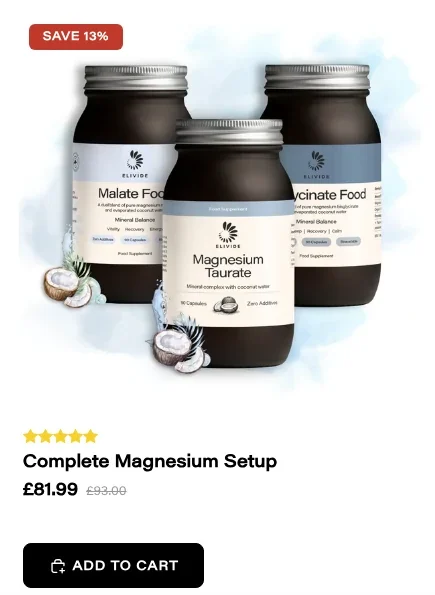
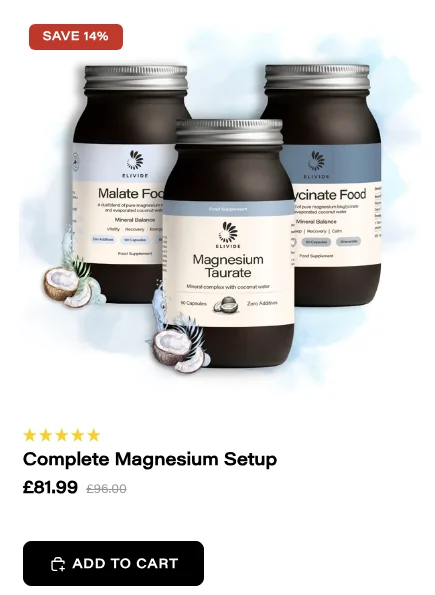
Wrong "was" price and "Save %" in Complete Your Routine
What was wrong: Bundle cards mixed one option's price with another option's "was" price, for example "£81.99 was £93.00, Save 13%" where the real figures are "was £96.00, Save 14%". The "This item" card also ignored the option the shopper had picked.
What we did: Every price, "was" price and saving now comes from the exact option the card adds. "This item" follows the shopper's choice of jar, refill or subscription, and adds exactly that.
2
Privacy, shipping and refund policies
What was wrong: The privacy policy was thin and had a garbled sentence, the shipping policy was blank, the refund policy had clothing-shop wording and clashed with the 30-day guarantee, and the terms had a typo in a heading.
What we did: We've drafted complete replacements for all four (and the optional contact information page), written for UK law and using your real company details, delivery prices and guarantee. They're at the bottom of this page with copy buttons. Nothing has been published.
Please have them checked by a legal adviser, and fill in the 11 points marked [CONFIRM: ...] (for example your VAT number and who pays return postage) before publishing them in Shopify > Settings > Policies.
3
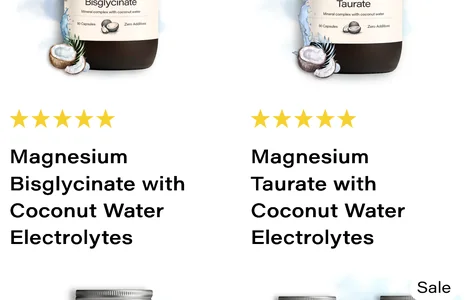
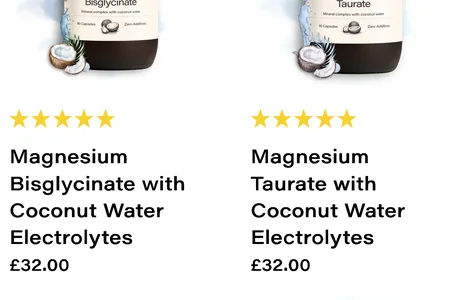
No prices on search results and in "You may also like"
What was wrong: Every product with a subscription option showed no price on search results, the "page not found" product list, the cart's "You may also like" and the quick-add pop-up.
What we did: Prices now show everywhere. They're only left out on a product's own page where the subscription widget already shows them.
4
The magnesium quiz recommends the wrong magnesium
What was wrong: Answers gave points by their position, so "better sleep" pushed Malate (the energising form) and "more energy" pushed Bisglycinate (the calming one).
What we did: The original scoring from your quiz design is back. We checked all 2,187 possible answer combinations:
| Before | After | |
|---|---|---|
| Recommendation matches what the answers point to | 39% | 77% |
| "Sensitive to acidic forms", yet Malate recommended | 44% | 5% |
| Sleep answers, yet Malate recommended | 33% | 0% |
One choice for you: with this scoring, Bisglycinate wins most mixed answer sets (82% overall), because it gets a second-choice point on most answers. Shoppers whose answers clearly point to energy, heart health or calm get the right form. If you'd like, we can remove Bisglycinate's point from the four energy answers: that raises the match to 92%, but "acidic" answers would then get Malate 15% of the time.
5
81 broken links in the newest blog articles
What was wrong: "Take our quiz" buttons went to a page that doesn't exist, links pointed to a Clear Spiral product no longer on this store, and many links went to unpublished draft articles.
What we did: 18 articles are corrected: the quiz buttons go to the quiz, Clear Spiral links go to the product on clearspiral.co.uk, links to unpublished drafts are turned into plain text (as you chose), and empty links are removed. In all, 19 links fixed, 57 links to drafts turned into plain text and 16 empty links removed. We checked every other link in all 40 articles.
6
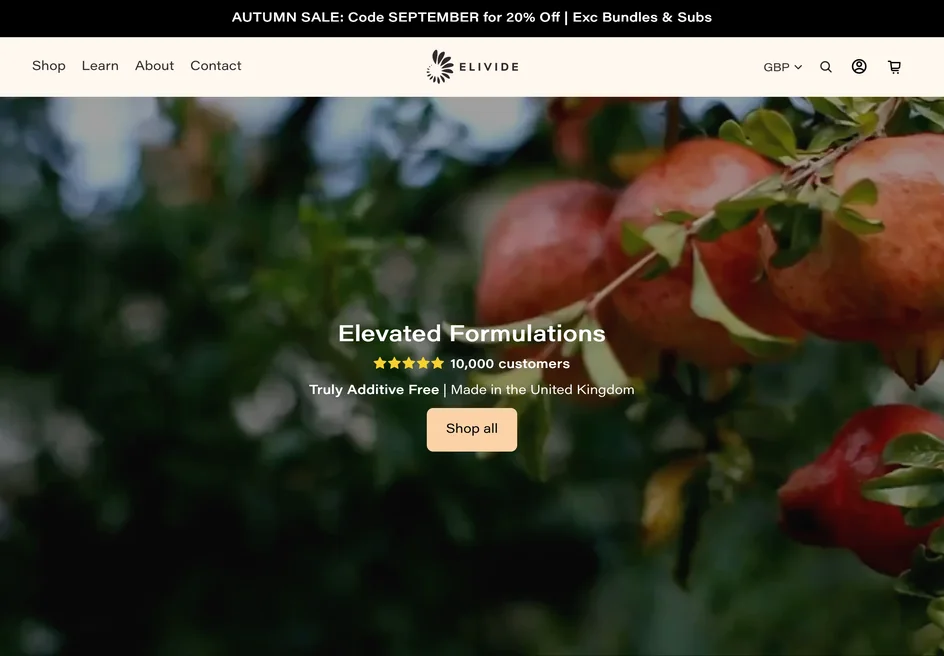
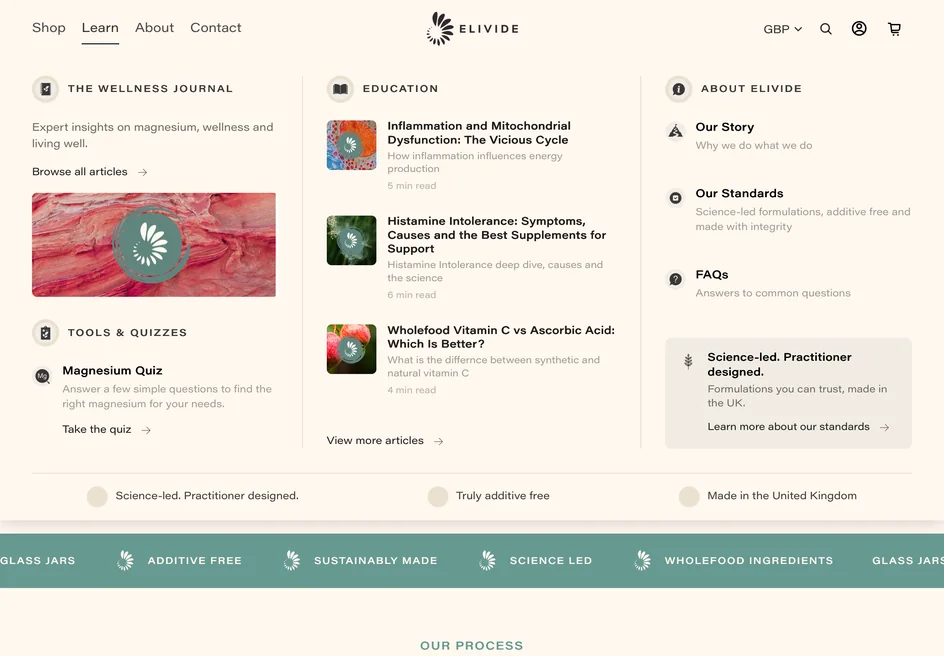
iPad: the Learn menu can't be opened by tapping
What was wrong: On iPad the menus opened on "hover", which a tap ends straight away, so Learn (and More in portrait) couldn't be opened, and tapping Learn jumped to the top of the page.
What we did: On touch screens the first tap opens the menu and a second tap follows the link. "Learn" now links to the Wellness Journal (this part is already live), and nothing jumps any more.
7
Android: the Back gesture can freeze the page
What was wrong: Closing the pop-up or the cart with Android's Back gesture left the page unable to scroll.
What we did: Every way of closing a pop-up or drawer now unlocks the page, and the pop-up remembers it was closed. We tested 14 ways of closing on both the pop-up and the cart.
Worth a one-minute check on a real Android phone once it's live.
Important
8
Product pages can freeze after switching to "Subscribe" a few times
What was wrong: Each switch doubled the work the page did, so after 15 switches one click took almost 6 seconds.
What we did: The subscription widget now sets itself up once. After 15 switches a click takes about half a second, the same as the first.
9
The sticky "Add to cart" bar shows the wrong price for subscriptions
What was wrong: The bar at the bottom of product pages always showed the one-off price and ignored the quantity, but added the subscription at the chosen quantity.
What we did: The bar now shows the price of exactly what it adds, including the subscription price and the quantity, and updates as options change.


10
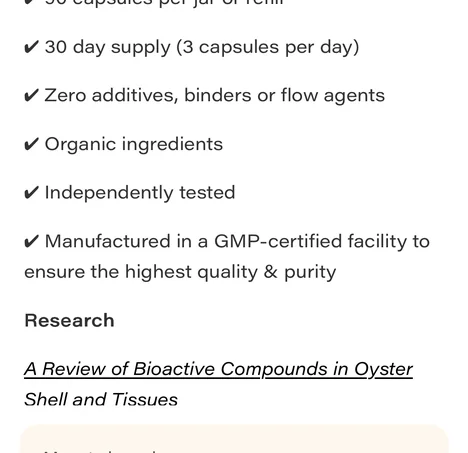
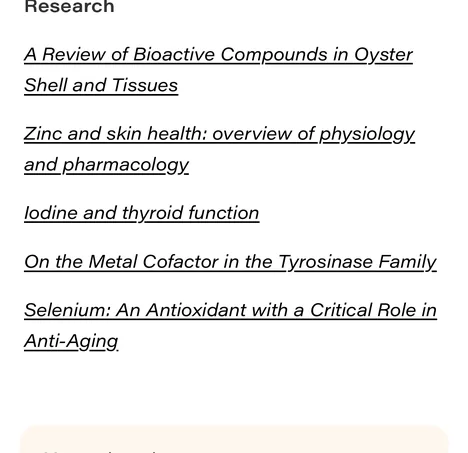
"More Info" cuts off long product descriptions on phones
What was wrong: On phones, long "More Info" text was cut off, for example the research references on Skin Mineral.
What we did: The section now opens to the full length of any description, with the same smooth animation.
11
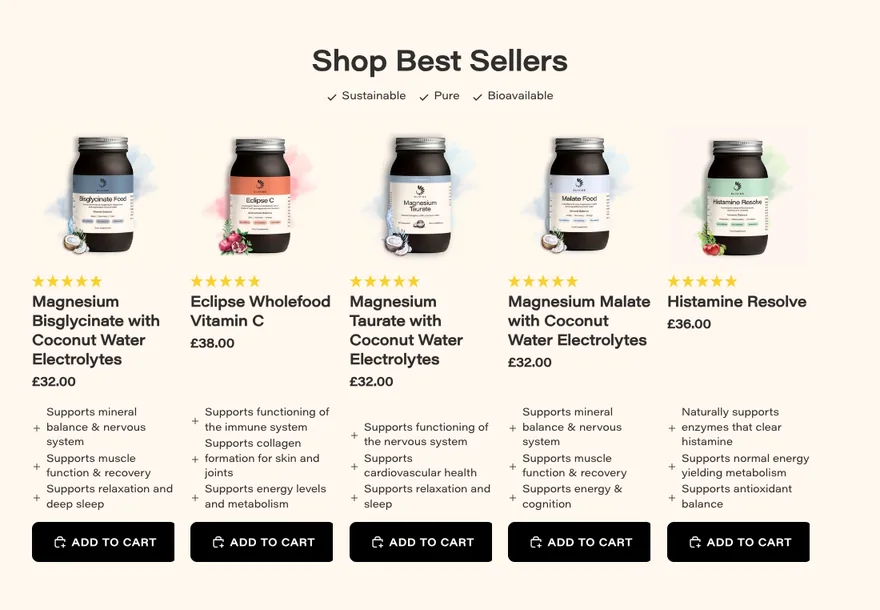
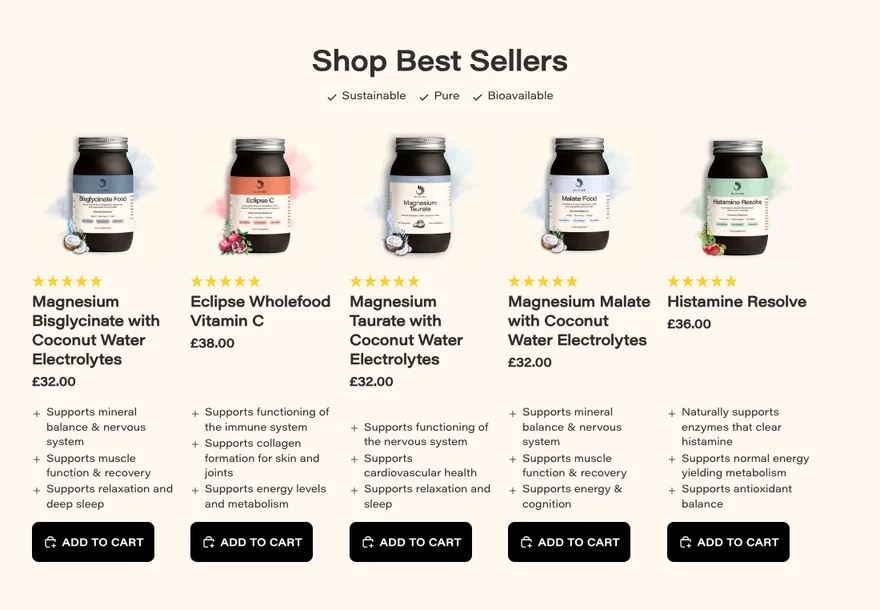
Homepage "Add to cart" buttons are cut off
What was wrong: On most iPhones and on small laptops, the Best Sellers buttons were wider than their cards and got sliced off.
What we did: The buttons now always fit their cards. We also tied each custom jar photo to its product, so the photos stay right if the best-seller order changes.
12
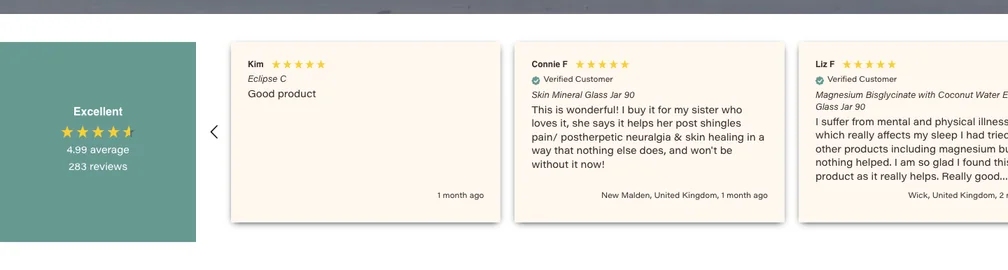
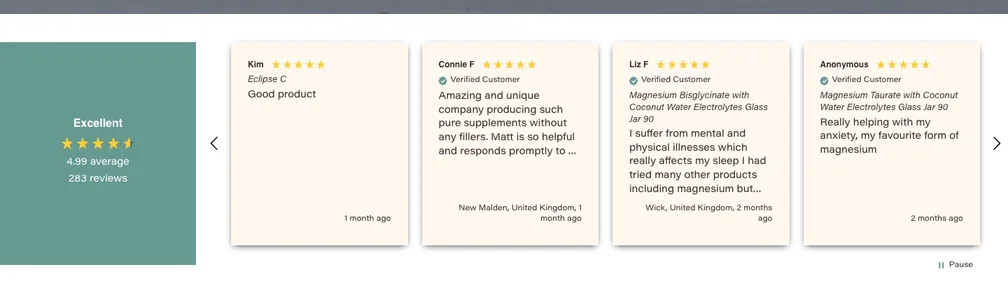
Homepage reviews carousel runs off the screen
What was wrong: The reviews carousel was wider than the screen, so the last card and the "next" arrow were cut off.
What we did: The carousel now fits on every screen size, with both arrows visible.
13
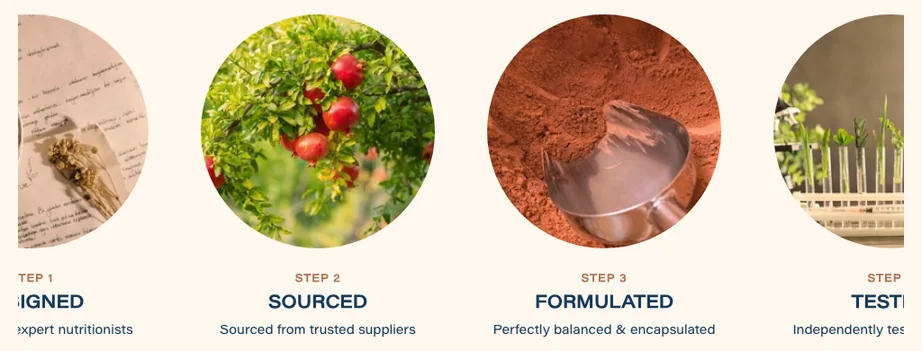
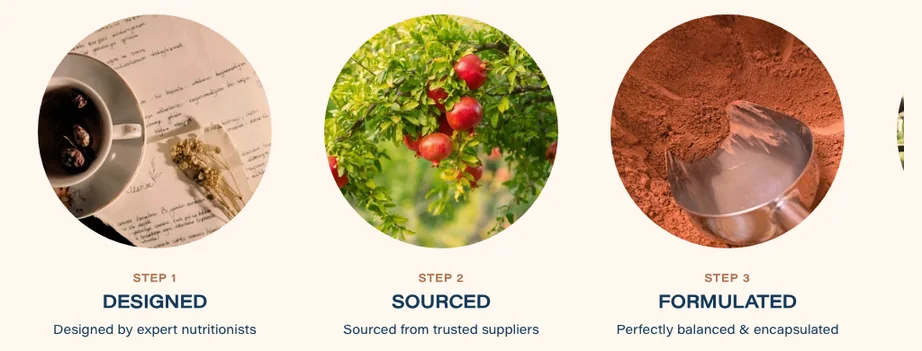
Homepage "Our Process" carousel cuts off the first step
What was wrong: On tablets and laptops, Step 1 was cut off on the left with no way to scroll to it, and swipes on phones landed slightly too far.
What we did: Step 1 is always fully visible, the steps still centre when they all fit, and swipes land exactly on each step.
14
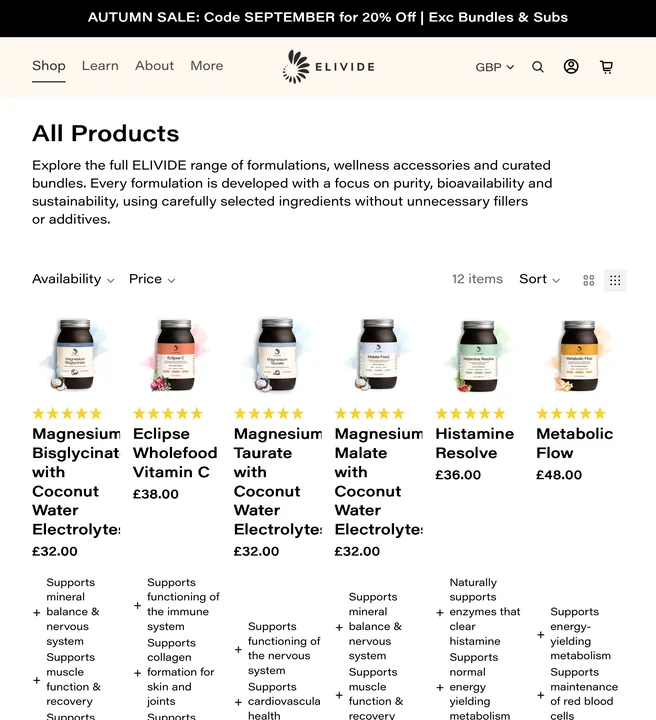
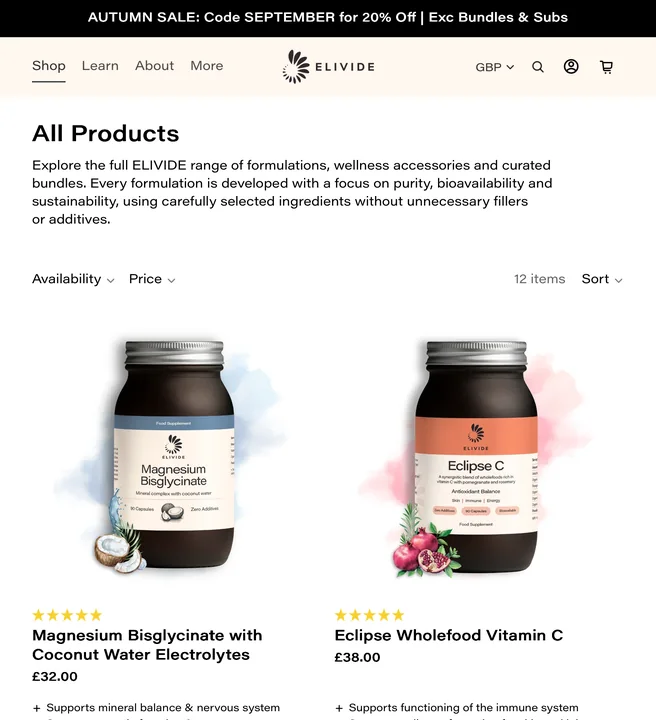
The "zoom out" grid button on collection pages
What was wrong: The button did nothing on desktop and squashed products into 6 tiny columns on iPad. A related style also narrowed text blocks across the site.
What we did: As agreed, the button is gone on desktop and tablet and the phone 1 or 2 column switch still works. The stray style no longer affects other pages, and photos in the one-column phone view are now sharp.
15
Browser Back doesn't undo a filter or sort
What was wrong: After filtering or sorting a collection, Back changed the web address but not the products.
What we did: Back and Forward now step through your filters and sorts, restoring the products, the sort and the ticked filters.
16
Welcome pop-up problems
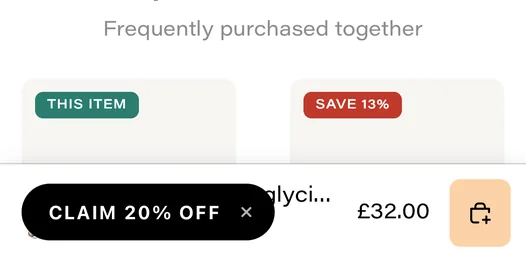
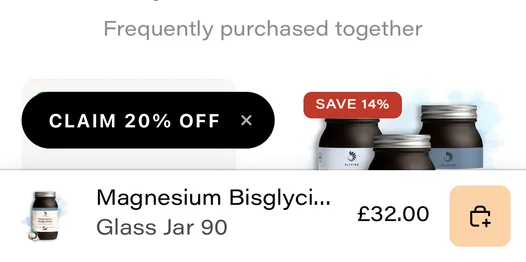
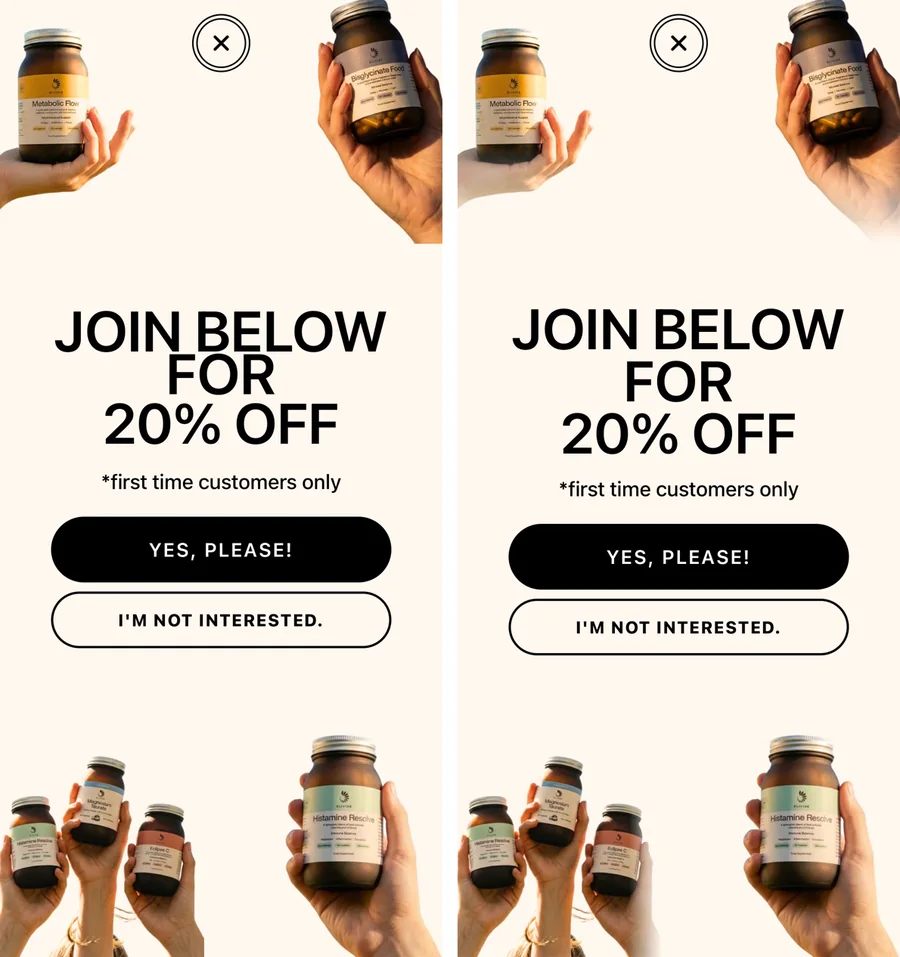
What was wrong: The pop-up could open over the cart, its tag covered the phone's sticky Add to cart bar, tapping the code twice copied "Copied!", subscribers saw it again after 3 days, and a few visual glitches.
What we did: All fixed: the pop-up waits until the cart, menu or cookie banner is closed; the tag moves clear of the sticky bar and hides while the menu is open; the code copies every time; people who signed up don't see it again; the close button has no double ring; the photos fade softly and the heading lines are spaced on phones; and keyboard users stay on the visible step.
17
Safari shows an error after viewing a product
What was wrong: On every iPhone and Mac Safari, a script error appeared after viewing a product, and "recently viewed" didn't work in search.
What we did: The error is gone and recently viewed products show in search again.
18
The blog stops loading more articles
What was wrong: Scrolling the Wellness Journal stopped loading new articles partway through.
What we did: All 40 articles now load as you scroll, on phones and computers. Opening a later page of the blog no longer makes the first post jump in size.
19
Desktop menu behaviour
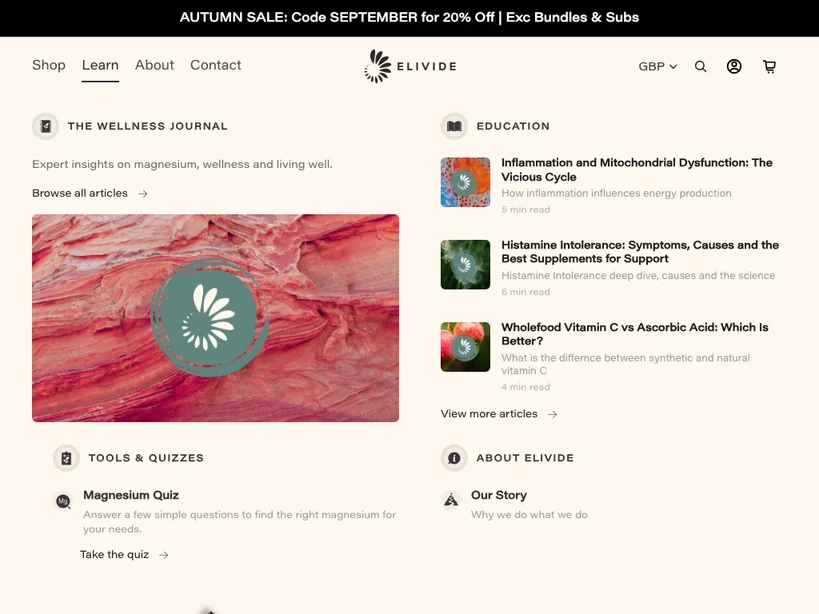
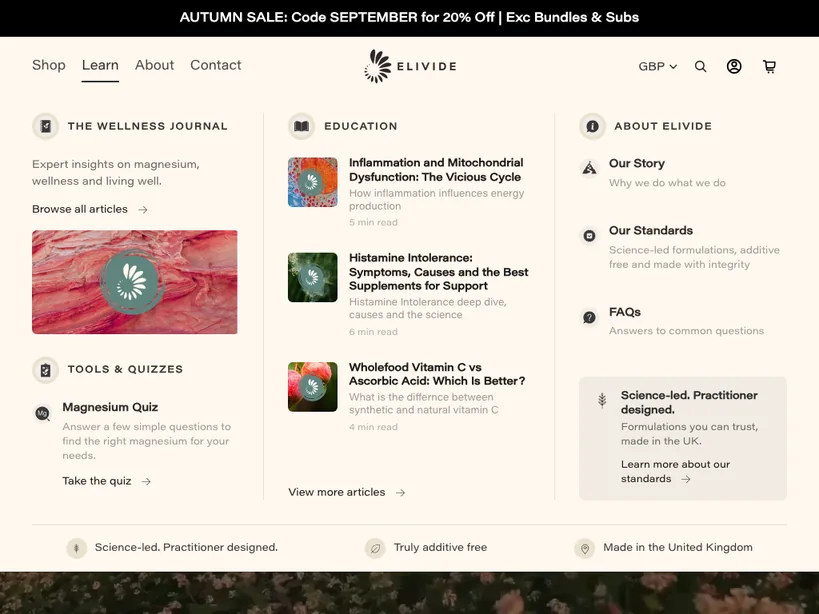
What was wrong: Moving the mouse diagonally towards the Shop menu switched to Learn or About, Esc didn't close menus, and on tablets and small laptops the Learn menu ran off the bottom of the screen.
What we did: Menus now tolerate diagonal mouse movement, Esc closes them, and the Learn menu fits the screen at every size. Its large photo no longer downloads on phones, and its links line up with their icons.
20
Free-shipping message is wrong outside the UK
What was wrong: US shoppers were told "Add $X more for FREE UK SHIPPING", and other currencies compared against the wrong amounts.
What we did: The free-shipping message and progress bar now show only to UK shoppers, using the £55 threshold. Shoppers elsewhere see delivery costs at checkout as usual.
21
The empty cart page looks broken
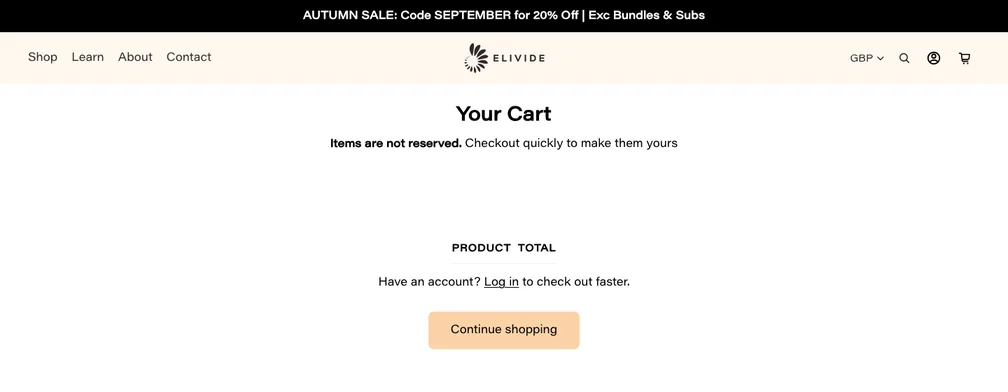
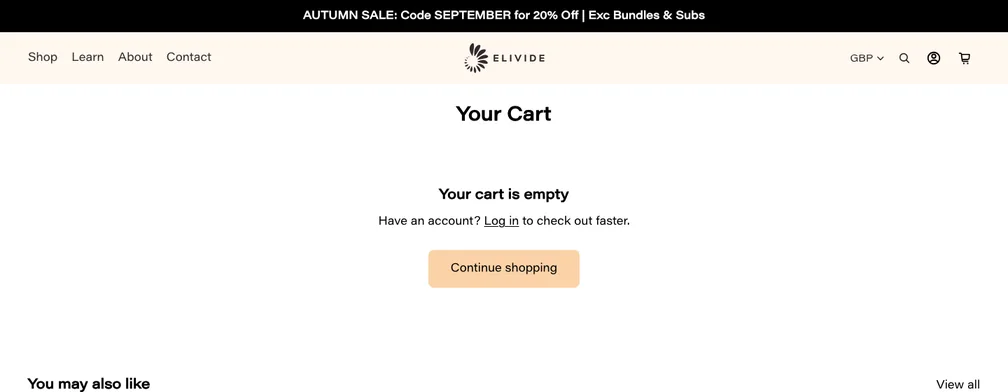
What was wrong: An empty cart showed column headings with nothing under them and "Items are not reserved", but no "your cart is empty" message.
What we did: It now says your cart is empty with a "Continue shopping" button, and switches to that view straight away when the last item is removed.
22
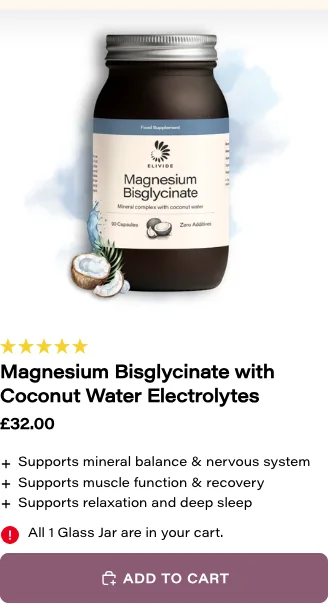
A failed "Add to cart" looks like it worked
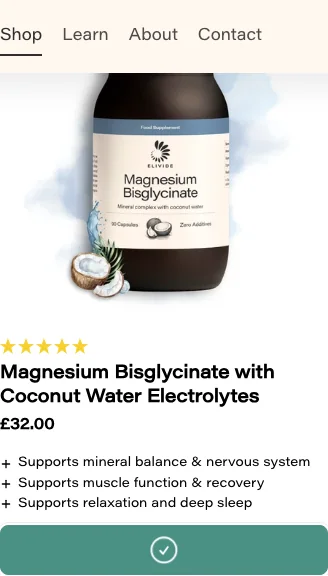
What was wrong: If an item couldn't be added (for example it sold out), product cards still showed a success tick and no explanation.
What we did: The tick now only shows once the cart has accepted the item. Otherwise the card explains why it failed, and the cart drawer stays closed. This applies to collection cards, the homepage Best Sellers, quick add and the sticky bar.
23
Contact page form and social links
What was wrong: The phone field rejected normal UK numbers written with spaces, "+44" or brackets, required fields weren't checked, and the Facebook and Instagram icons went nowhere.
What we did: Normal phone formats are accepted, name, email and message are required, and the icons link to your Facebook and Instagram pages.
24
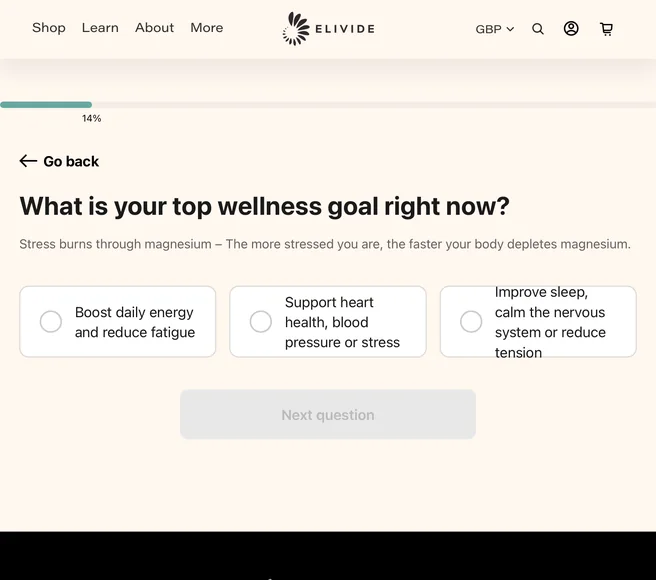
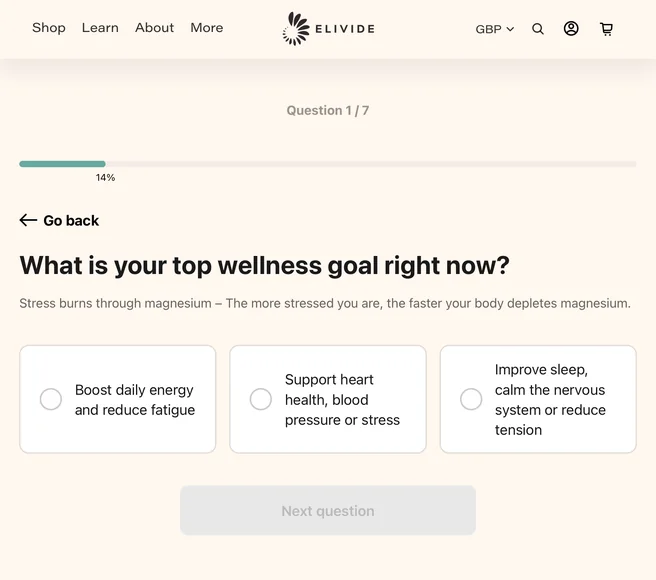
Quiz display and usability
What was wrong: Result cards showed the wrong price and always "£", adding to the cart hid the cart count, "Go back" could be undone, the quiz didn't work with a keyboard, the iPad layout was cut off, and one unpublished product would break the whole quiz.
What we did: All fixed: prices match the option and the shopper's currency, the cart count updates, Back works, the quiz can be completed by keyboard and screen reader, the layout fits iPads and phones, and a missing product is simply skipped.
Content and settings
25
Wrong section titles on two bundle pages
What was wrong: On Elevated Energy and The Wholefood Duo, the first section was titled "Nutrition info" or "Full ingredients" but held the formulator's highlights.
What we did: Both are now titled "Key highlights", like every other product.
26
A stray "was £35.00" on the Magnesium Malate refill pouch
What was wrong: The refill pouch showed a "was £35.00" price that none of the other refills had.
What we did: Removed.
27
"Frequently purchased together" isn't set up
What was wrong: Only Metabolic Flow had matching products set, so most "Complete Your Routine" sections showed the same fallback products.
What we did: Set for all 11 supplements and bundles, based on your bundles. For example, Magnesium Bisglycinate suggests Taurate and Malate (the Complete Magnesium Setup), and Histamine Resolve suggests Eclipse C and Taurate (the Histamine Balance Stack). You can change these any time in the Search & Discovery app.
28
Wording that's wrong or out of date
What was wrong: The FAQ said "founded in 2021", the Shipping page was out of date, and there were a few typos.
What we did: The FAQ now says 2020, matching the About page. The Shipping page now lists your real delivery prices and the £55 free UK delivery, and drops the out-of-date refill and pandemic wording (already live). Typos fixed: "differnce", "It's acts", "magnesium and malic", "releasing my formulations" and "Personalized".
We left the autumn sale banner alone, as agreed: it comes down after the offer ends.
29
Mistakes inside blog articles
What was wrong: A link to the pomegranate article went to the magnesium guide, a comparison table had empty headings, one article had a stray letter and missing spaces, and an NHS link was broken.
What we did: All corrected, alongside the link fixes in item 5. The table headings now read "Form", "Strengths" and "Considerations".
30
Page headings for search engines
What was wrong: The Contact, FAQ and search pages had no main heading for search engines, and the Collab page duplicated the Affiliate page.
What we did: Each now has a main heading, with no visible change. The Collab page is unpublished and its address now leads to the Affiliate page, which took over its search engine title and description (already live).
Every page also has a hidden heading added by the Klaviyo sign-up form. That one is part of Klaviyo's form and can't be changed from the website.
31
The theme editor shows settings that do nothing
What was wrong: Several settings in the theme editor (pop-up, menu drawer, blog, footer, video and shipping) had no effect.
What we did: Each is now either working or removed. Where a setting can't work on this store (font choices, since your brand font is built in), the editor now says so. The homepage video setting now controls the video that plays.
32
Take down the SEPTEMBER banner after 4 October
What was wrong: The banner promotes the SEPTEMBER code, which ends on 4 October 2026 at 23:59 UK time.
What we did: Left for you, as agreed: please remove or change it in the theme editor when the offer ends.
Smaller points
All 18 smaller points from the list are done, and live:
- Search count: The number of results now matches the products shown.
- Product feature bar: It no longer freezes after a tap or screen rotation, and its text no longer runs over the next icon on iPad.
Before: text runs into the next icon 
After: text wraps neatly 
- Homepage scrolling text: The speed setting now works the right way round (kept at today's pace) and dragging never leaves a blank strip.
- Homepage quiz panel: The "Shop All Products" link stays readable on hover.
- Structured Glass Bottle page: The empty band where the timeline would be is gone.
- About page: The "What we stand for" heading is visible again.
Before: the heading is invisible 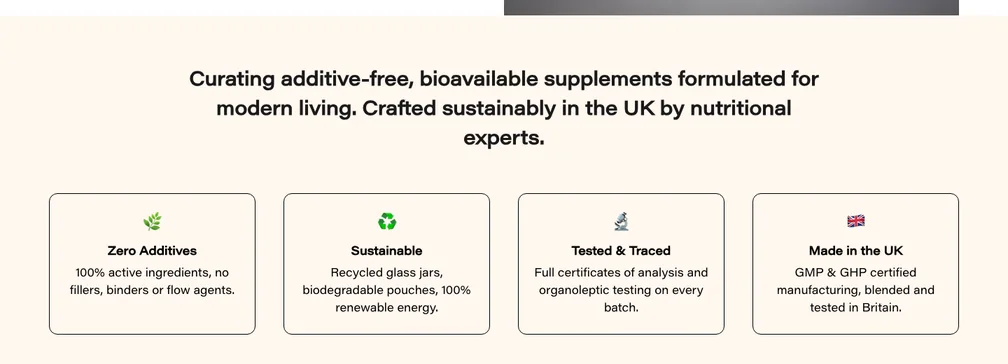
After: "WHAT WE STAND FOR" shows 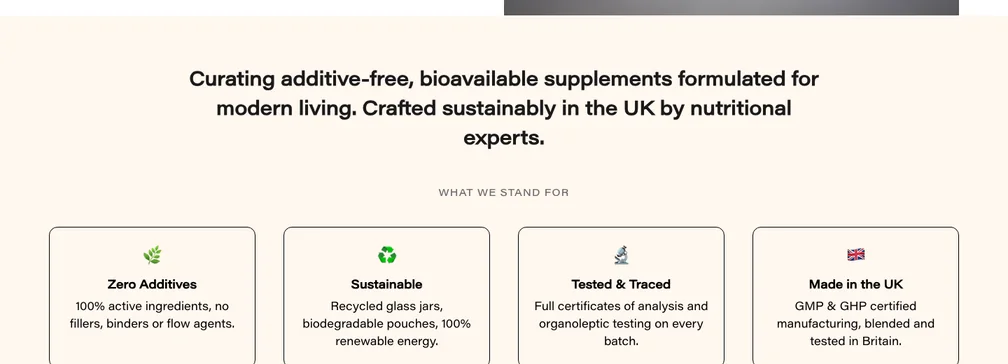
- FAQ page: Category headings stay pinned while scrolling (below the menu bar when it shows), reduced-motion settings are respected, and answers opened by "find in page" no longer stay hidden.
After: "Products & Orders" stays pinned while its questions scroll 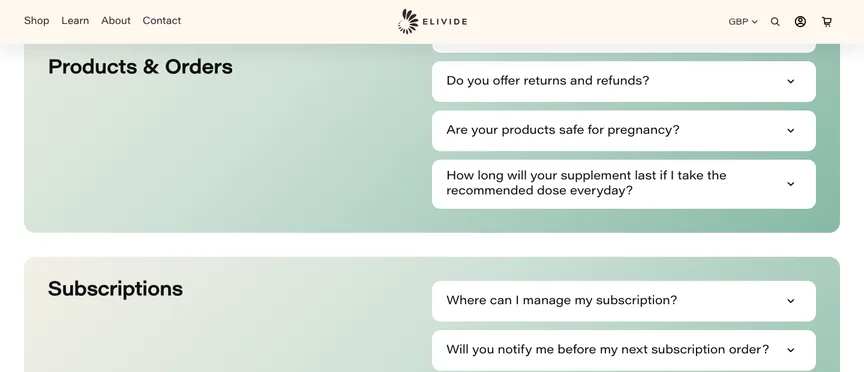
- Blog articles: The breadcrumb keeps its Home icon on phones, the byline reads "Matt Jarosy – May 05, 2021", and Share says "Link copied" when there's no share sheet.
Before: Home icon missing, "Jarosy– April" 
After: Home icon back, spaced byline 
- Homepage details: The articles carousel arrows only show when there's more to see, the footer payment icons are centred on phones, and the light strip at the edge of the hero video is gone.
Before: last row of icons left-aligned 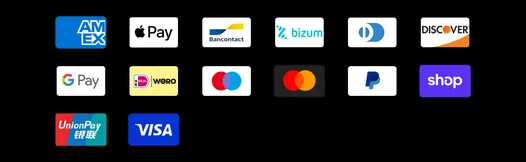
After: every row centred 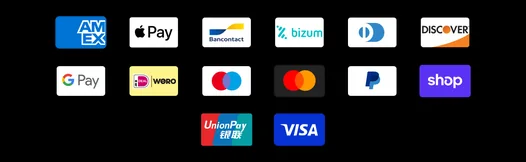
- Speed: Fonts download once instead of twice, blog card images are right-sized, and the Learn menu photo no longer loads on phones.
- Collection cards: The "+" icons line up with wrapped benefits, one-column photos are sharp, search cards have side margins on phones, and single-photo products have space above the title.
- Old menu links: Histamine Balance Stack and Immune & Histamine now link straight to their current pages.
- Homepage Best Sellers images: Custom photos are tied to each product, not to its position in the list.
- Keyboard and screen readers: The "skip to content" link is back, buy buttons, option tiles and the cart drawer show focus outlines, filter controls have labels, and hidden pop-up steps can't be reached by Tab.
- Information for search engines: The FAQ questions are included, the homepage video has a fixed date, and products carry their star rating in the store's own data. We suggest switching off "rich snippets" in your REVIEWS.io settings, so Google sees one product record instead of two.
- Page code: The element that sat where browsers don't allow it in the page header has been moved.
- Phone menu: It now reopens at the top. The small white box seen in our test browser is not part of the site; worth a quick look on a real iPhone.
- Hidden translations: The Best Sellers sale badge and blog comments now use working translations.
Policy drafts for your approval
These replace the current policies. They follow UK law as we understand it (UK GDPR, the Consumer Contracts Regulations and the Consumer Rights Act), but they aren't legal advice, so please have them checked before publishing. Nothing has been published yet.
To publish: open Shopify > Settings > Policies, press "Copy this policy" below, paste it into the matching policy and replace each [CONFIRM: ...] note with your answer.
Privacy policyShow the draft
Rewritten as a full UK GDPR privacy notice: what you collect (orders, accounts, subscriptions, the pop-up sign-up, reviews, affiliate applications) and why, who it's shared with, how long it's kept, people's rights and how to complain to the ICO. The garbled cookie sentence is gone.
Last updated: [CONFIRM: the date you publish this policy]
This privacy policy explains how ELIVIDE LTD ("ELIVIDE", "we", "us") collects and uses your personal information when you visit elivide.com, buy from us, take out a subscription, create an account, sign up to our emails, leave a review or get in touch. It also explains your rights and how to use them.
1. Who we are
ELIVIDE LTD is the controller of your personal information. We are a private limited company registered in England and Wales (company number 14148103), with our registered office at 3rd Floor, 207 Regent Street, London, W1B 3HH, United Kingdom. We are registered with the Information Commissioner's Office (ICO) under registration number ZB500008.
If you have any questions about this policy or about your information, email us at info@elivide.com.
2. The information we collect
Information you give us
- When you place an order: your name, email address, delivery and billing addresses, phone number (if you give it), the products you buy and any notes you add. Payments are handled by our payment providers; we never see or store your full card details.
- When you subscribe: the products, quantities and delivery frequency you choose, your delivery address and your subscription history (for example skips, swaps and cancellations). Our subscriptions are run by Recharge.
- When you create or use an account: your name, email address, saved addresses and order history.
- When you sign up to our emails: your email address (and your name, if you give it), for example when you claim our welcome offer in the pop-up or use the sign-up form at the bottom of our pages, together with when and where you signed up.
- When you contact us: your name, email address, phone number (if you give it) and whatever you write to us, whether through our contact form or by email.
- When you leave a review: your name, email address, your rating and review, and any photos you add. Reviews are collected and shown on our site by Reviews.io.
- When you apply to our affiliate programme: the details you submit through Shopify Collabs, such as your name, email address and social media profiles.
Information collected automatically
When you use our website, we and our partners collect information about your device and how you use the site, such as your IP address, browser and device type, the pages you visit, the products you view or add to your basket, and whether you open or click our emails. Much of this is collected with cookies and similar technologies (see section 6).
Health information
We don't need any health information to sell you our products. If you choose to tell us about your health, for example when asking which supplement might suit you, we will only use it to answer you and will never use it for marketing. Your answers to our magnesium quiz are worked out in your own browser and are not sent to us.
3. How we use your information
Data protection law says we must have a lawful reason (a "lawful basis") for each way we use your information. Here is what we do and why:
- To process and deliver your orders and subscriptions, take payment, send order, dispatch and delivery updates, email you a reminder 3 days before each subscription order, and handle returns, refunds and guarantee claims. Lawful basis: to perform our contract with you.
- To run your account and provide customer service, including answering your messages. Lawful basis: our contract with you, or our legitimate interest in helping our customers.
- To send you marketing emails, such as offers, new formulations, articles and your welcome discount code. Lawful basis: your consent. You can unsubscribe at any time using the link in every email or by emailing us.
- To remind you about items left in your basket or checkout. [CONFIRM: keep this point only if you send basket or checkout reminder emails] Lawful basis: our legitimate interests, as permitted by the Privacy and Electronic Communications Regulations. Every reminder includes a way to opt out.
- To show you relevant adverts on other websites and social media (Google, Facebook, Instagram and Pinterest) and to measure how well our adverts work. Lawful basis: your consent, given through our cookie banner.
- To understand and improve our website through analytics. Lawful basis: your consent, given through our cookie banner. Cookies that are strictly necessary for the site to work don't need consent.
- To collect and publish customer reviews. After you buy, Reviews.io may email you an invitation to review your purchase. Lawful basis: our legitimate interest in collecting genuine customer feedback. You can opt out of review requests at any time.
- To run our affiliate programme, including working out which sales came from an affiliate's link. Lawful basis: our legitimate interests, and our contract with each affiliate.
- To prevent fraud and keep our website secure. Lawful basis: our legitimate interests and our legal obligations.
- To keep business records and meet our legal obligations, for example under tax and accounting rules. Lawful basis: legal obligation.
4. Who we share your information with
We do not sell your personal information. We share it only with trusted service providers who help us run our business, under contracts that require them to keep it safe and use it only for the services they provide to us:
- Shopify, which hosts our website, shop, checkout and customer accounts.
- Payment providers: Shopify Payments (including Shop Pay, Apple Pay and Google Pay) and PayPal. If you choose Shop Pay or PayPal, their own terms and privacy policies also apply.
- Recharge, which manages subscriptions and the subscription portal.
- Klaviyo, which runs our sign-up forms (including the welcome offer pop-up) and sends our emails.
- Reviews.io, which collects and displays customer reviews.
- Delivery companies, such as Royal Mail and DHL, which receive your name, delivery address and, where needed, your phone number and email address so they can deliver your order and send tracking updates.
- Advertising and analytics partners, if you allow these cookies: Google (Google Analytics and Google Ads), Meta (Facebook and Instagram), Pinterest and Moast (an analytics app we use on our site).
- Shopify Collabs, which runs our affiliate programme.
- [CONFIRM: we found a custom tracking pixel in Shopify > Settings > Customer events. Say here which service it sends data to, or remove it.]
- Professional advisers and authorities: our accountants, lawyers and insurers, and the police, courts, HMRC or other authorities where the law requires it or where it is needed to protect our rights.
- A buyer of our business, if we sell or reorganise all or part of it, so that they can continue to serve you under this policy.
5. Transfers outside the UK
Some of our service providers, such as Shopify, Klaviyo, Recharge, Google, Meta and Pinterest, store or access information outside the UK, including in the European Economic Area, Canada and the United States. When this happens, your information is protected by safeguards that UK law recognises, such as UK adequacy regulations, the UK International Data Transfer Agreement or Addendum, or the UK Extension to the EU-US Data Privacy Framework.
6. Cookies and similar technologies
Cookies are small text files stored on your device when you visit a website. Similar technologies, such as pixels and your browser's local storage, work in a similar way. We use them for these purposes:
- Strictly necessary: to run the shop, for example to remember your basket, keep you signed in, process checkout securely and remember your cookie choices. These don't need your consent.
- Functional: to remember your settings, for example that you have closed our welcome pop-up, or your magnesium quiz result.
- Analytics: Shopify analytics, Google Analytics, Recharge and Moast, to understand how visitors use our site so we can improve it.
- Marketing: Google Ads, Meta (Facebook and Instagram), Pinterest and Klaviyo, to show you relevant adverts, measure them and tailor our emails, and Shopify Collabs, to credit our affiliates for the sales they refer.
When you first visit our website, our cookie banner asks for your choice, and we only use analytics and marketing cookies if you accept them. [CONFIRM: check the cookie banner is switched on for the UK in Shopify > Settings > Customer privacy.] You can change your choice at any time by clearing the cookies for elivide.com in your browser settings and choosing again when the banner reappears. [CONFIRM: if you add a "Cookie preferences" link to the website footer, say "or use the Cookie preferences link at the bottom of any page" instead.]
Cookies last for different lengths of time, from the end of your visit up to two years.
7. How long we keep your information
- Orders, payments and refunds: six years after the end of the financial year they relate to, as UK tax law requires.
- Your account: for as long as it stays open. You can ask us to delete it at any time.
- Subscriptions: while your subscription is active, and afterwards as part of our order records.
- Marketing emails: until you unsubscribe. After that we keep your email address on a "do not contact" list so we don't email you again by mistake.
- Messages and customer service records: for as long as we need them to deal with your query and any follow-up.
- Reviews: for as long as they are published. You can ask us to remove yours.
8. Your rights
Under UK data protection law (the UK GDPR and the Data Protection Act 2018) you have the right to:
- ask for a copy of the personal information we hold about you;
- ask us to correct information that is wrong or incomplete;
- ask us to delete your information;
- ask us to restrict how we use your information;
- object to how we use your information, including the right to stop direct marketing at any time;
- receive your information in a portable format, or ask us to send it to another organisation;
- withdraw your consent at any time, where we rely on consent. This doesn't affect anything we did before you withdrew it.
To use any of these rights, email info@elivide.com. There is usually no charge. We will reply within one month, and we may ask you to confirm your identity first.
If you are unhappy with how we have handled your information, please contact us first so we can try to put it right. You also have the right to complain to the Information Commissioner's Office (ICO) at ico.org.uk/make-a-complaint or on 0303 123 1113.
9. Keeping your information secure
We follow accepted industry standards to protect the personal information you give us, and we expect the same of our service providers. However, no website or online database can be guaranteed to be completely secure, so, as with any organisation, we cannot guarantee the absolute security of your information.
10. Disclosure required by law
We may disclose your personal information where the law requires it, or where we believe disclosure is necessary to protect our rights or to comply with a court order or other legal process.
11. Children
Our website and products are not aimed at children, and we do not knowingly collect personal information from children.
12. Changes to this policy
We may update this policy from time to time, for example if we start using a new service. The latest version will always be on this page, with the date it was last updated.
13. Contact us
ELIVIDE LTD, 3rd Floor, 207 Regent Street, London, W1B 3HH, United Kingdom
Email: info@elivide.com
Refund policyShow the draft
The clothing-shop wording is gone. The 30-day money-back guarantee now clearly covers opened products, as your product pages promise, alongside the legal 14-day right to cancel and rights for faulty items.
We want you to be happy with every order. This policy explains our 30-day money-back guarantee, your legal right to cancel, and what to do if something arrives damaged or faulty. None of it affects your legal rights as a consumer.
Our 30-day money-back guarantee
You can try our formulations risk-free. If you're not completely satisfied with your order, contact us at info@elivide.com within 30 days of receiving it and we'll arrange a return and a refund. This applies even if you have opened the product.
- Please include your order number and tell us which product you would like to return.
- We'll email you instructions on how and where to send it back. Please don't send anything back without contacting us first, as we may not be able to match it to your order.
- [CONFIRM: who pays the return postage under the guarantee, for example "You pay the cost of sending the item back" or "We'll send you a prepaid returns label".]
- [CONFIRM: any limits you apply, for example "one guarantee claim per product per customer". Delete this point if there are none.]
- The guarantee doesn't apply to gift cards. [CONFIRM: your current policy also excludes sale items. Say here whether discounted items are covered by the guarantee. This exclusion can only apply to the guarantee, not to your legal rights below.]
Your legal right to cancel within 14 days
Under the Consumer Contracts Regulations, you can also cancel your order for any reason within 14 days of the day you (or someone you nominate) receive it. To cancel, tell us clearly by emailing info@elivide.com within that time. This right applies to customers in the UK and the EU.
- For health and hygiene reasons, this legal right doesn't cover supplements that were sealed when delivered and have since been unsealed. Opened products can still be returned under our 30-day money-back guarantee above.
- Please send the item back within 14 days of telling us you are cancelling. You pay the cost of returning it, unless it is faulty or we sent you the wrong item.
- We'll refund the price you paid plus the standard delivery charge you paid for the order (if you chose a more expensive delivery option, we refund the cost of standard delivery). We may reduce the refund if the item has been handled more than was needed to check it.
- For subscriptions, the 14 days start from the day you receive your first delivery. You can also cancel future subscription deliveries at any time from your account, as explained in our Terms of service.
Damaged, faulty or wrong items
Please check your order when it arrives. If anything is damaged, faulty or not what you ordered, email us at info@elivide.com as soon as possible, ideally with a photo, so that we can look into it and put it right with a replacement or a refund. We'll cover any postage costs.
This is in addition to your rights under the Consumer Rights Act 2015. Products must be as described, fit for purpose and of satisfactory quality. If they aren't, you're entitled to a full refund if you tell us within 30 days of delivery, and after that to a repair, a replacement or, in some cases, a refund.
Exchanges
The fastest way to get what you want is to return the item you have and, once we've accepted the return, place a separate order for the new item.
Refunds
We'll let you know once we've received and checked your return, and whether your refund has been approved. Approved refunds are paid to your original payment method within 10 working days, and always within 14 days of us receiving the item back. Your bank or card provider may take a few more days to show the refund in your account. If more than 15 working days have passed since we approved your return, please contact us at info@elivide.com.
Contact us
ELIVIDE LTD, 3rd Floor, 207 Regent Street, London, W1B 3HH, United Kingdom
Email: info@elivide.com
We'll tell you where to send your return when we accept it.
Shipping policyShow the draft
New (it was blank): dispatch times, UK and international delivery options with the prices from your checkout, the £55 free UK delivery, and customs.
This policy explains where we deliver, how long it takes and what it costs. If you have any questions, email us at info@elivide.com.
Dispatch
We aim to dispatch all orders received by 11am (UK time) on a working day the same day, subject to stock. When your order is on its way, we'll email you to confirm, with tracking details where your delivery service provides them.
UK delivery
- Free UK delivery on orders of £55 or more, sent by Royal Mail Tracked 24 (usually 1 to 3 days).
- Orders under £55: Royal Mail Tracked 48 (usually 2 to 4 days) for £3.20, or Royal Mail Tracked 24 (usually 1 to 3 days) for £4.20.
International delivery
- We deliver to most of Europe, the USA, Canada, Australia, New Zealand and selected countries in Asia and the Middle East, including Japan, South Korea, Singapore, Hong Kong, Taiwan, China, Qatar and the United Arab Emirates. If your country appears at checkout, we can deliver there.
- Delivery options and prices depend on the destination and are shown at checkout before you pay. For example, sending a single jar costs:
- to Ireland: £14.50 by Royal Mail International Tracked (usually 14 to 21 days), or £24.50 by DHL Economy International (usually 3 to 5 days);
- to the USA: £17.50 by Royal Mail International with import duties paid (usually 7 to 14 days), or £21.50 by DHL Express Worldwide with import duties unpaid (usually 3 to 5 days).
- Delivery times vary by destination and can be longer if a parcel is held by customs.
Customs, duties and taxes
If you choose a duties-paid service (currently Royal Mail International to the USA), import duties are already covered, so there is nothing more to pay on delivery.
For all other deliveries outside the UK, any customs fees, import taxes and duties are the customer's responsibility. Customs authorities require us to state the value of your order on the package, and it is at their discretion to release it. Import charges can change with exchange rates, shipping costs, clearance fees and how customs classify the items. Since 1 July 2021, all commercial goods imported into the EU are subject to VAT, whatever their value. Please check your tracking details or contact your local customs office if your parcel is held.
Subscriptions
Subscription orders are dispatched automatically on the schedule you choose, and we email you 3 days before each one so you can skip, change or cancel it in your account.
Delivery problems
- If your UK order hasn't arrived within 10 working days, please email us at info@elivide.com so we can investigate. Delivery times outside the UK vary by country and service.
- Your order is our responsibility until it is delivered to you. If it is lost in transit or arrives damaged, contact us and we'll send a replacement or give you a refund. See our Refund policy for more details.
- Please check that your delivery address is complete and correct when you order. If you spot a mistake, email us as soon as possible and we'll do our best to correct it before dispatch.
Contact us
ELIVIDE LTD, 3rd Floor, 207 Regent Street, London, W1B 3HH, United Kingdom
Email: info@elivide.com
Terms of serviceShow the draft
The heading typo is fixed, and it adds your company details, subscriptions, health wording and the consumer protections UK terms need.
ABOUT US
This website, elivide.com, is run by ELIVIDE LTD, a company registered in England and Wales (company number 14148103). Our registered office is 3rd Floor, 207 Regent Street, London, W1B 3HH, United Kingdom. Our VAT number is [CONFIRM: VAT registration number]. You can contact us at info@elivide.com.
ACCEPTANCE
Your access to and use of the ELIVIDE website is subject to these terms and conditions. You must not use the website for any purpose that is unlawful or prohibited by these terms. By using the website you accept the terms, conditions and disclaimers in this notice. If you buy from us, our Shipping policy, Refund policy and Privacy policy also apply to your order.
ELIVIDE RESERVES THE RIGHT TO:
- Change or remove (temporarily or permanently) the website or any part of it without notice. We will not be liable to you for any such change or removal.
- Change these terms and conditions at any time. Your continued use of the website after a change means you accept it. The terms that apply to an order are the ones published when you placed it.
PRICES AND PAYMENT
Our prices are shown in pounds sterling (GBP) and include VAT where it applies. If you shop in another currency, the converted price is shown before you pay. Delivery charges are shown at checkout before you place your order.
SUBSCRIPTIONS
Many of our products can be bought on subscription, which is run by our subscription provider, Recharge. A subscription is a repeat order: we charge your chosen payment method and send your products at the frequency you choose (for example every 4, 6, 8 or 12 weeks, depending on the product), at the subscription price shown when you subscribe, until you cancel.
- We'll email you 3 days before each subscription order, so you have time to make changes.
- You can skip or delay an order, change how often it arrives, swap products or cancel at any time in your account, or by emailing us, before your next order is processed. Cancelling stops future orders. Orders that have already been processed are covered by our Refund policy.
- If we change the price of a subscription, we'll tell you before the new price applies, so you can cancel if you wish.
HEALTH INFORMATION
Our products are food supplements. Food supplements should not be used as a substitute for a varied, balanced diet and a healthy lifestyle. Do not exceed the recommended daily dose shown on the label, and keep out of the reach of young children.
The information on our website, including our articles and our magnesium quiz, is for general information only and is not medical advice. If you are pregnant, breastfeeding, taking medication or under medical supervision, please speak to your doctor before taking any supplement.
PRODUCTS AND AVAILABILITY
Products are subject to availability, and products in your basket can be bought by other customers until you complete your order. We do our utmost to update or remove products as soon as they sell out. Because there is a short delay between when an order is placed and when it is approved, the stock position can change in the meantime. If, after we have approved your order, a product you ordered turns out to be out of stock, we will tell you as soon as possible and you will not be charged for it (or we will refund you if you have already paid). We will not otherwise be liable for not being able to supply it. Where available, you may be able to order an item in advance and we will send it to you once it is back in stock. You can email us to cancel your order if you would prefer not to wait.
INTELLECTUAL PROPERTY RIGHTS AND TRADEMARKS
Unless otherwise stated, ELIVIDE and/or its licensors own the intellectual property rights in all material on the website (including text, graphics, software, databases, photographs and other images, videos, sound, trademarks and logos). ELIVIDE® is a registered trademark. All intellectual property rights are reserved. You may access this website for your own personal use, subject to the restrictions in these terms.
Unless we agree in advance and in writing, you must not:
- republish material from this website;
- sell, rent or sub-license material from this website;
- reproduce, duplicate or copy material from this website;
- redistribute content from this website.
DISCLAIMERS AND LIMITATION OF LIABILITY
To the extent permitted by law, ELIVIDE will not be liable for any indirect or consequential loss or damage whatever (including loss of business, opportunity, data or profits) arising out of or in connection with the use of the website.
ELIVIDE makes no warranty that the website will be uninterrupted or error free, that defects will be corrected, or that the website or the server that makes it available are free of viruses or anything else which may be harmful or destructive.
Nothing in these terms excludes or limits our liability for death or personal injury caused by our negligence, for fraud or fraudulent misrepresentation, or for anything else that cannot be excluded or limited by law. Nothing in these terms affects your legal rights as a consumer, for example under the Consumer Rights Act 2015.
YOUR RESPONSIBILITIES AND SEVERANCE
If you break these terms, for example by copying our content without permission, you are responsible for any reasonable losses and costs this causes us.
If any part of these terms is found to be invalid or unenforceable, the rest of the terms will continue to apply.
GOVERNING LAW
These terms are governed by the law of England and Wales. You can bring legal proceedings in the courts of England and Wales. If you live in Scotland or Northern Ireland, you can also bring proceedings in your local courts.
CONTACT US
ELIVIDE LTD, 3rd Floor, 207 Regent Street, London, W1B 3HH, United Kingdom
Email: info@elivide.com
Contact information (optional)Show the draft
Shopify's Contact information page is blank; this fills it with the business details UK online shops must show.
ELIVIDE LTD
3rd Floor, 207 Regent Street
London
W1B 3HH
United Kingdom
Email: info@elivide.com
Registered in England and Wales, company number 14148103.
VAT number: [CONFIRM: VAT registration number]
[CONFIRM: add a phone number here only if you want one shown publicly.]
Points to confirm before publishing
| Privacy | The date you publish it. |
| Privacy | Keep the basket reminder emails line only if you send cart or checkout reminders. |
| Privacy | What the custom pixel in Settings > Customer events does (or remove it). |
| Privacy | That the cookie banner is switched on for the UK (Settings > Customer privacy). |
| Privacy | Optional: a "Cookie preferences" link in the footer. |
| Refund | Who pays return postage under the 30-day guarantee. |
| Refund | Any limits on the guarantee, for example one claim per product. |
| Refund | Whether discounted items are covered by the guarantee. |
| Terms | Your VAT number. |
| Contact | Your VAT number. |
| Contact | A phone number, only if you want one shown. |