This is everything else we found when we checked every page of elivide.com on desktop and on iPhone. It leaves out the review-star fixes, which are already live; those are in the first report.
There are 32 items, most important first, plus a list of smaller polish points at the end. Each item says where the fix is made. Theme fixes are changes to the website's code, which we make and test on a private preview before they go live. Shopify admin items are settings or wording changed in Shopify itself.
Priority
- Fix firstA legal or pricing risk, or something that stops people shopping.
- ImportantA problem shoppers will notice.
- ContentWording, product data or settings to correct.
Where it's fixed
- Theme fixA change to the website's code.
- Shopify adminA setting, policy, product or page edited in Shopify.
- Check on a deviceFound by simulating the device; worth a one-minute check on a real one.
At a glance
Fix first
1
Wrong "was" price and "Save %" in Complete Your Routine
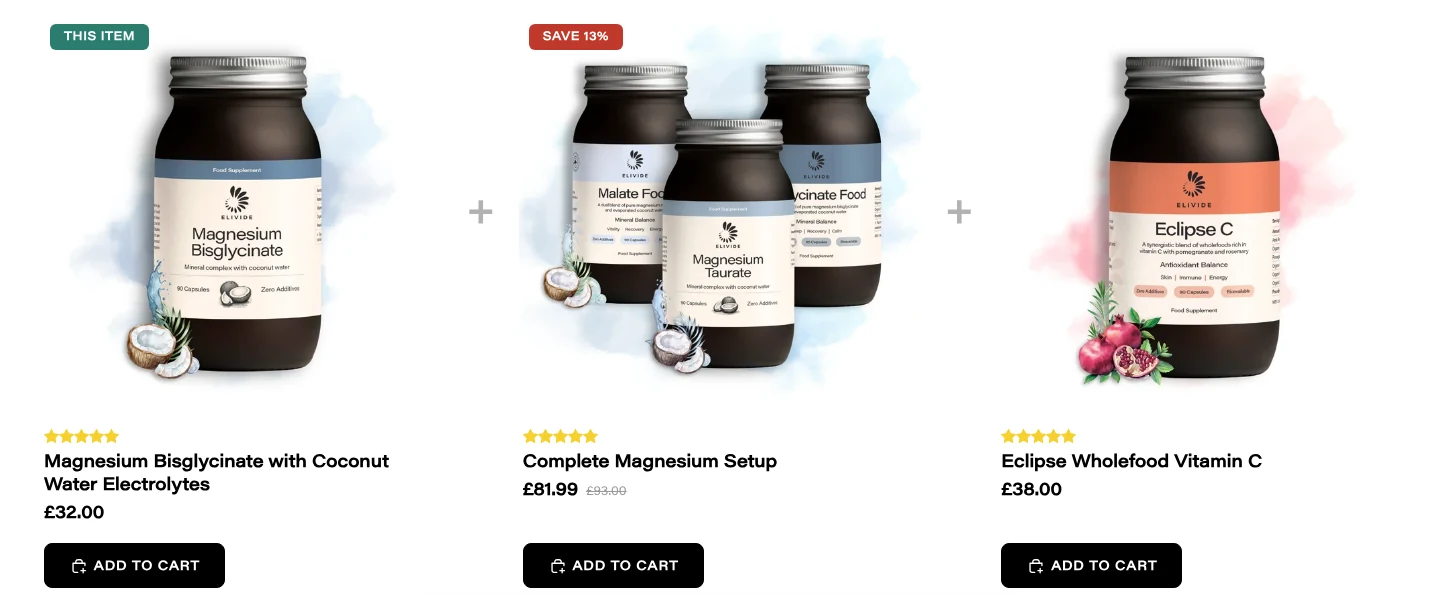
The problem: on 13 of the 14 product pages, the "Complete Your Routine" cards mix up prices from different options. Complete Magnesium Setup shows £81.99, was £93.00, Save 13%, but the Glass Jars option it's selling has a "was" price of £96.00; £93.00 belongs to the Refill Pouches. Elevated Energy shows £69.00, was £78.00, while its own page says £69.00, was £80.00. The "This item" card also always adds a one-time Glass Jar, even after the shopper picked Refill Pouch or Subscribe.
Why it matters: a "was" price that doesn't match the item is a pricing accuracy risk under UK consumer rules, and shoppers can end up with an option they didn't choose.
The fix: take the price, "was" price and Save % from the same option, and make "This item" follow the option the shopper picked.
Technical notes
sections/customers-also-bought.liquid:127-139 uses the product-level compare_at_price next to the variant's price; :9, :78, :90 use selected_or_first_available_variant.
2
Privacy, shipping and refund policies
The problem:
- The privacy policy only covers cookies, security and a disclaimer. It doesn't mention email marketing, the welcome pop-up sign-up, customer accounts, subscriptions or UK GDPR rights, and has a garbled sentence ("We do not store in cookies to any...").
- The shipping policy page is blank apart from its title.
- The refund policy still has clothing-shop wording ("unworn or unused, with tags"), and "seal unbroken" conflicts with the 30-day money-back guarantee.
- The terms of service heading says "INTERLLECTURAL PROPERTY".
Why it matters: these are the legal pages shoppers rely on, and the privacy policy has to describe the data you actually collect.
The fix: update them in Shopify admin under Settings › Policies. We're not lawyers, so a quick legal check is worthwhile.
3
No prices on search results and in "You may also like"
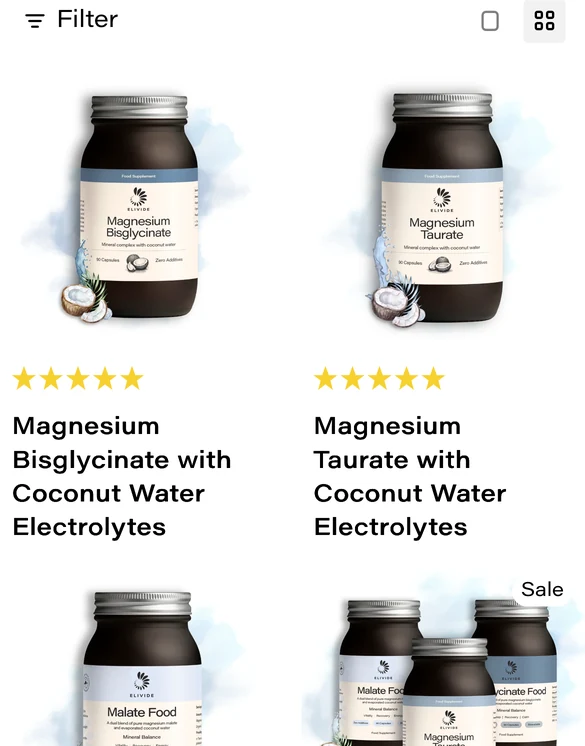
The problem: for 8 of the 14 products (every product with a subscription option), no price shows on the search results page, in "You may also like" on the cart page, in the product list on the "page not found" screen, or in the quick-add pop-up.
Why it matters: shoppers can't see what things cost in these places, which loses sales.
The fix: show the normal price everywhere except the product page itself, where the subscription widget already shows it.
Technical notes
blocks/price.liquid:7-15 prints nothing when a product has selling plans. The same block is used by templates/search.json, cart.json, 404.json and the quick-add modal.
4
The magnesium quiz recommends the wrong magnesium
The problem: each quiz answer adds a point to a product by its position (first answer to Bisglycinate, second to Taurate, third to Malate), whatever the answer says. So "Improve sleep, calm the nervous system" and "I'm sensitive to acidic forms" both push Malate, the energising and acidic form, while "Boost daily energy" pushes Bisglycinate, the calming one. That's the opposite of your own blog and product descriptions, and the top recommendation is wrong for over half of all possible answer combinations. The quiz was set up correctly in March; the scoring was flattened in a June update.
Why it matters: customers who ask for help choosing are being pointed to the wrong product.
The fix: restore the intended scoring. The original quiz scoring is still in the project files.
Technical notes
Points are the answer_N_pN settings in templates/page.magnesium-match.json. Intended weights are in quiz-app/prisma/seed.js (order Taurate, Bisglycinate, Malate, so p2, p1, p3). Hand-set points existed in commit 7aa3ad1 and were reset in fcce445.
5
81 broken links in the newest blog articles
The problem: the 11 newest articles contain 81 links that lead to "page not found":
- the "Take our quiz" button in 7 articles points to /pages/magnesium-match instead of /pages/find-your-magnesium-match;
- 7 links go to a Clear Spiral product page that no longer exists on this store;
- 25 links go to articles that are still unpublished drafts.
Two links in older articles quietly send readers to the homepage instead.
Why it matters: readers hit dead ends right where you're asking them to take the quiz or read on, and broken links hurt search rankings.
The fix: publish the draft articles (or remove those links), correct the quiz link, and add redirects for the old addresses in Shopify admin.
6
iPad: the Learn menu can't be opened by tapping
The problem: on iPad, where the desktop menu shows, tapping "Learn" opens its menu for a split second and closes it as soon as the finger lifts, and the page jumps to the top. In portrait, "Contact" sits under "More", which has the same problem, so iPad visitors can't reach the contact page from the menu.
The fix: open these menus on tap, and give "Learn" a real link.
Found with Safari's engine and touch simulation. Worth a one-minute check on a real iPad.
Technical notes
The menu opens on pointerenter and closes on pointerleave (blocks/_header-menu.liquid:88-94, assets/header-menu.js:5, 75-148); touch fires pointerleave as the finger lifts. The Learn menu item's link is "#".
7
Android: the Back gesture can freeze the page
The problem: if a shopper closes the welcome pop-up or the cart drawer with Android's Back gesture, the page is very likely left unable to scroll, because the theme only unlocks scrolling when its own close button is used. The pop-up also wouldn't remember it was closed.
Why it matters: the welcome pop-up opens for every new visitor, and Back is how many Android users dismiss pop-ups.
The fix: unlock scrolling whenever the browser closes a pop-up, however it was closed.
Confirmed in the code and a desktop browser simulation. Needs a one-minute check on a real Android phone.
Technical notes
assets/dialog.js restores page scrolling only in closeDialog() and has no cancel or close listener, so a browser-initiated close leaves body fixed.
Important
8
Product pages can freeze after switching to "Subscribe" a few times
The problem: each switch to "Subscribe" doubles some background work on the page. After about 15 switches the page slows down and can freeze.
The fix: set that work up once, instead of again on every switch.
Technical notes
assets/scripts.js:82-102: initWidget adds event listeners and a MutationObserver that each call initWidget again.
9
The sticky "Add to cart" bar shows the wrong price for subscriptions
The problem: with "Subscribe" selected and a quantity of 2, the sticky bar at the bottom of the page still shows the one-time price for one item (for example £36.00), but tapping it adds two subscription items at £30.60 each.
The fix: make the bar show the price and quantity that will actually be added.
Technical notes
The bar renders the theme price (sections/product-information.liquid:116), which never reflects the Recharge selection. Its quantity label listens for quantitySelectorUpdate (assets/sticky-add-to-cart.js:83, 285), but blocks/quantity-external.liquid:157 fires a plain change event.
10
"More Info" cuts off long product descriptions on phones
The problem: the "More Info" section on product pages can't grow past a fixed height, so on phones the end of long descriptions, the research references, is hidden. Skin Mineral loses about 260 pixels of text; Magnesium Malate, Magnesium Taurate and Eclipse Vitamin C lose some too.
The fix: let the section grow to fit its content.
Technical notes
sections/product-more-info.liquid:74-86: the opening animation leaves max-height: 2000px with overflow: hidden.
11
Homepage "Add to cart" buttons are cut off
The problem: in the homepage Best Sellers, the right side of each "Add to cart" button is sliced off on most iPhones, and on iPad landscape and small laptops.
The fix: let the button fit the width of its card.

Technical notes
sections/featured-collection-custom.liquid:216-220 (card has overflow: hidden) and :377-396 (button is fit-content, no wrapping).
12
Homepage reviews carousel runs off the screen
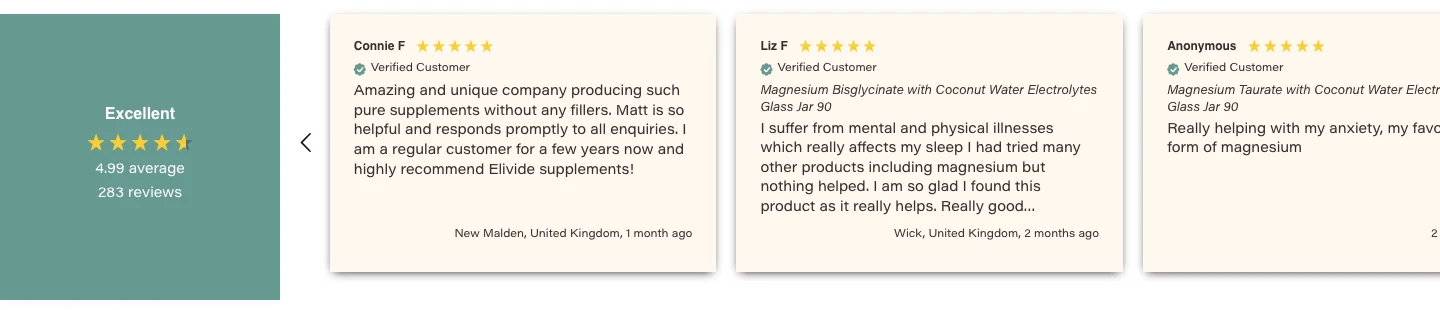
The problem: the Reviews.io carousel near the top of the homepage is wider than the page, so the third review is cut off and the "next" arrow is off-screen. Mouse users can't move forward through the reviews.
The fix: point the width rule at the carousel again; it targets an old ID that changed.
Technical notes
assets/base.css:10-11, 39-41 target #...AQjVvczlCNndtaXVKZ__reviews_io_reviewsio_card_carousel_YtgrCR; the live block ID now starts ASEdSU2xTWWlPKzVaR.
13
Homepage "Our Process" carousel cuts off the first step
The problem: on iPad landscape and small laptops, the first step is cut off on the left (it reads "TEP 1") and can't be scrolled into view. On phones, each swipe lands slightly too far, cutting the edge of the next card.
The fix: centre the row without clipping, and measure swipes from the carousel itself.
Technical notes
sections/process-steps.liquid:231-235 (justify-content: center on an overflowing row; use safe center) and :366, 386 (offsets measured from the page, not the scroller).
14
The "zoom out" grid button on collection pages
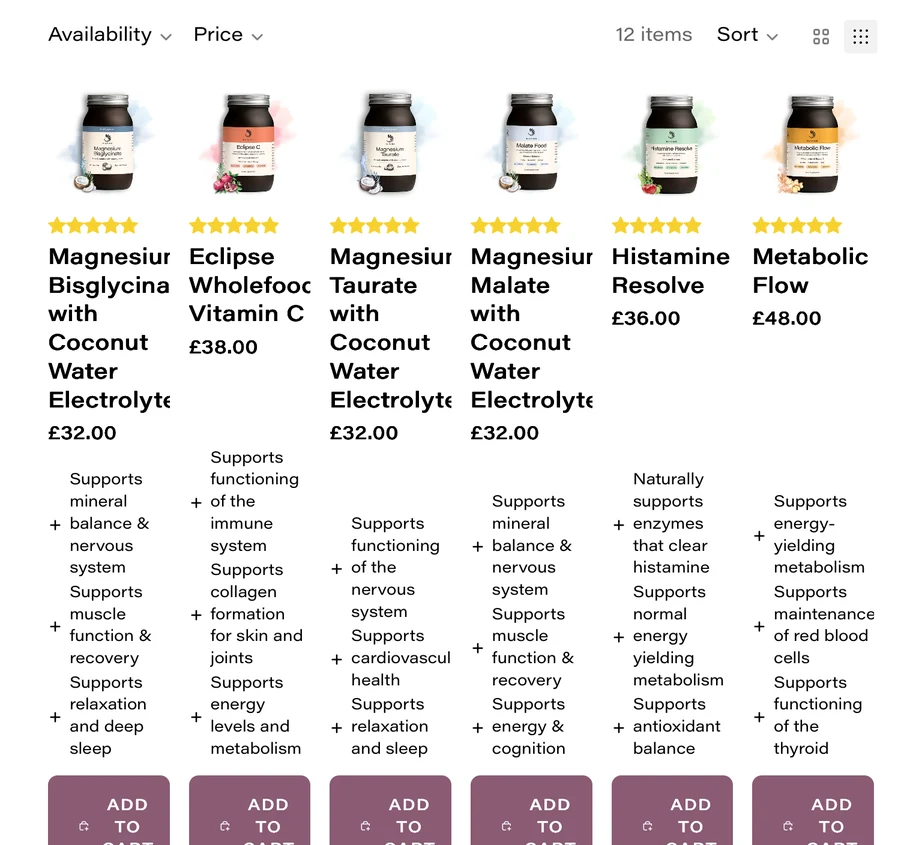
The problem: on desktop, the grid-size button does nothing. On iPad portrait it squeezes 6 columns in, so product names are cut off ("Magnesiur") and the buttons wrap onto 3 lines, and that choice is remembered on every collection page. A related style also limits the width of text blocks on every page of the site.
The fix: support the smaller grid properly, or hide the button.
Technical notes
snippets/rich-product-card.liquid:284-294 sits inside {% stylesheet %}, which is compiled into the site-wide stylesheet: it forces 4 columns with !important and caps .text-block.rte at 45em everywhere.
15
Browser Back doesn't undo a filter or sort
The problem: after filtering or sorting a collection, pressing the browser's Back button changes the address but leaves the products as they were.
The fix: restore the earlier results when the shopper goes back.
Technical notes
assets/facets.js:61-71, 97-101 push history entries, but nothing in the theme listens for popstate.
16
Welcome pop-up problems
- It can open on top of the cart right after a quick "Add to cart", and closing it then unlocks the page behind the open cart.
- The "Claim 20% off" tag covers the phone's sticky "Add to cart" bar and the social icons at the bottom of the phone menu.
- Tapping the discount code twice copies the word "Copied!" instead of the code, and leaves "Copied!" on screen.
- People who already signed up see the pop-up again after 72 hours.
- The new close button shows a double ring when the pop-up opens.
- On phones, the photos have hard cut-off edges and the two heading lines nearly touch.
- It can cover the cookie banner.
Technical notes
assets/welcome-popup.js:23-26 (opens without checking for other open dialogs), :42-49, 165-176 (signups only set the tag flag; all keys clear after 72 hours), :122-131 (copies textContent). snippets/welcome-popup.liquid:374-423, 426-455, 705-708, 766-790 (photo positions, no :focus-visible style, heading line height, tag z-index 999).
17
Safari shows an error after viewing a product
The problem: on iPhones and Macs using Safari, every page after the shopper views a product shows a script error, and "recently viewed" products never appear in the search box. This bug comes from Shopify's Horizon theme.
The fix: a one-line change to use the theme's fallback for a browser feature Safari doesn't have.
Technical notes
assets/predictive-search.js:60 calls the global requestIdleCallback, which no version of Safari supports; import the fallback from @theme/utilities.
18
The blog stops loading more articles
The problem: scrolling down the blog loads more articles, but each batch triggers an error. In our tests it stopped at 36 of the 40 articles, so the oldest weren't reachable. The address doesn't update as you scroll, and opening blog page 2 directly makes the page jump. This also comes from the Horizon theme, and will affect any collection with more than 24 products.
The fix: a one-line safety check.
Technical notes
assets/paginated-list.js:192, 231 call this.#aspectRatioHelper.processNewElements(), but the helper only exists when product card galleries are present.
19
Desktop menu behaviour
- Moving the mouse diagonally from "Shop" towards its columns switches to "Learn" or "About", or closes the menu.
- The Esc key doesn't close an open menu.
- On tablets and small laptops, the Learn menu runs below the bottom of the screen (233 pixels hidden at 1024 by 768), hiding its last links.
- Clicking "Learn" jumps to the top of the page.
Technical notes
assets/header-menu.js:5 (no hover delay), no Escape handler; snippets/learn-mega-menu.liquid:126, 188-193 remove the height cap; the Learn menu link is "#".
20
Free-shipping message is wrong outside the UK
The problem: the free-shipping bar tells US shoppers to "Add $X more for FREE UK SHIPPING", compares other currencies against an unconverted 55, and uses a €500 threshold for euros.
The fix: show the bar only to UK shoppers, or convert the threshold for each currency.
Found in the code. We didn't add items to a live cart in other currencies to see it.
Technical notes
snippets/shipping-progress.liquid:14-23, 54-56, 85-87, blocks/_shipping-progress.liquid:14-24, snippets/cart-summary.liquid:212-231, setting free_shipping_threshold_eur = 500.
21
The empty cart page looks broken
The problem: with nothing in the cart, the page has no "Your cart is empty" message. It still shows "Items are not reserved. Checkout quickly" and "PRODUCT TOTAL" headings over nothing, and on phones a tick next to "You're £55.00 away from FREE Shipping".

Technical notes
blocks/_cart-title.liquid ignores cart.empty? (and holds hidden debug text "test2" at line 24); blocks/_shipping-progress.liquid:75 renders the tick in the not-reached branch; sections/cart-hero.liquid:17.
22
A failed "Add to cart" looks like it worked
The problem: on collection pages, if adding to the cart fails, for example because an item sold out after the page loaded, the button still shows a green tick and no error appears.
The fix: show an error message when the cart refuses the item.
Technical notes
The card form in snippets/rich-product-card.liquid:97-111 has no error element, so assets/product-form.js:373 returns early.
23
Contact page form and social links
- The phone field rejects normal UK numbers written with spaces, "+44" or brackets, which stops the form sending.
- Name, email and message are marked as required but aren't actually checked.
- The Facebook and Instagram icons on the contact page don't link anywhere.
Technical notes
sections/contact-page.liquid:91 (pattern="[0-9\-]*"), :44-76, 96-108 (no required); templates/page.contact.json:124-125 (links set to "#").
24
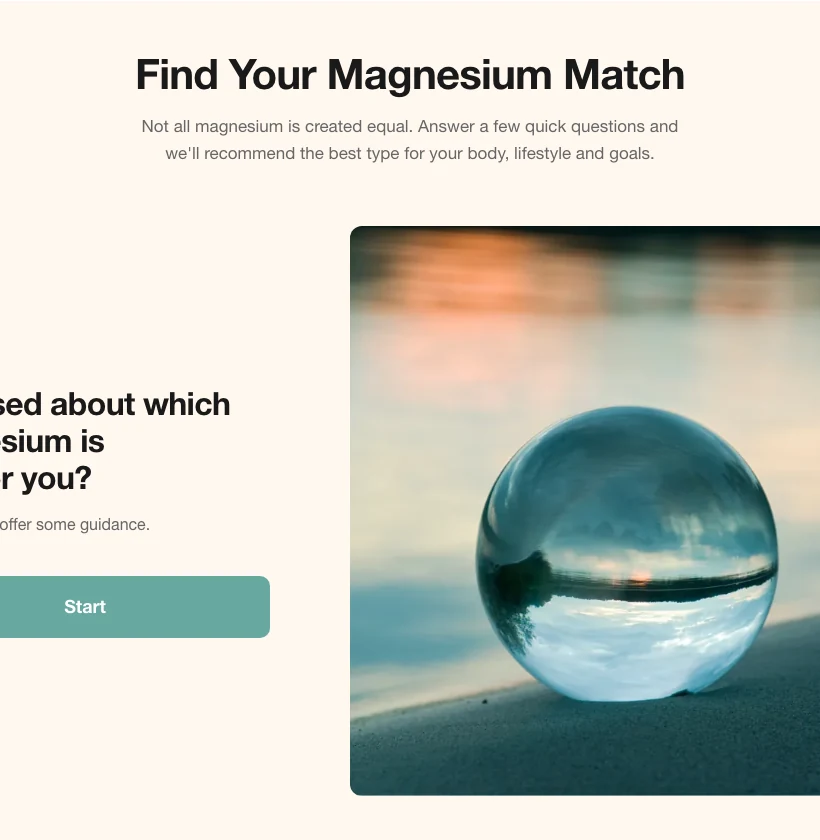
Quiz display and usability
- Result cards show the cheapest option's price (£31.00) but add the Glass Jar (£32.00), and changing the option doesn't update the price.
- Prices always show "£", even for shoppers paying in other currencies.
- Adding to the cart from the results hides the cart count in the header.
- "Go back" is undone if you'd just picked an answer.
- The quiz can't be completed with a keyboard or a screen reader.
- On iPad portrait the start screen is cut off, and some answers overflow their boxes.
- The question counter hides under the menu bar, and the match explanation runs off-screen on phones.
- The whole quiz shows an error if one of its products is ever unpublished.
Technical notes
All in sections/quiz.liquid: price 1028-1040, currency 1031, cart count 1304-1307, back button 1190-1202, keyboard 1085-1088, iPad layout 148, 181-241, 784, 486, counter 1187, fragile config 49, 60, 87-107.
Content and settings
25
Wrong section titles on two bundle pages
On Elevated Energy and The Wholefood Duo, the first section on the page, open by default, holds the formulator's quote but is titled "Nutrition info" (Elevated Energy) and "Full ingredients" (The Wholefood Duo), so each page shows that heading twice. It should read "Key highlights", like the other products. The titles are set in each product's details in Shopify.
26
A stray "was £35.00" on the Magnesium Malate refill pouch
Only the Magnesium Malate Refill Pouch has a "compare at" price (£35.00) set, so it shows "£31.00, was £35.00" on the product page's sticky bar while the other refill pouches show no "was" price. Remove it, or add matching ones to the others if it's intentional.
27
"Frequently purchased together" isn't set up
Complementary products are only set up for Metabolic Flow, so most product pages fall back to the same two suggestions (Complete Magnesium Setup and Eclipse Vitamin C). The single magnesium pages end up recommending a bundle that contains the same magnesium. These pairings are set in Shopify's Search & Discovery app.
28
Wording that's wrong or out of date
- The About page says "Est. 2020"; the FAQ says "founded in 2021".
- The Shipping page says refill packs are coming (they're already sold), has pandemic-era wording, and never states shipping costs or the £55 free UK delivery threshold the cart shows.
- Typos: "differnce" (Learn menu), "It's acts" and "magnesium and malic" (quiz), "releasing my formulations" (FAQ).
- The homepage quiz panel says "Personalized results" next to "PERSONALISED FOR YOU".
- On iPhones the autumn banner wraps onto 3 lines, with a stray "|" starting the last line.
29
Mistakes inside blog articles
- "Real vitamin C vs ascorbic acid": the "Unlocking the Power of Pomegranates" link goes to the magnesium forms guide.
- "Magnesium Malate: restoring energy and balance": the comparison table's header row is empty.
- "Magnesium glycinate for sleep and stress": a stray "H" after "electrolyte balance", and missing spaces after full stops.
- "Early symptoms of mitochondrial dysfunction": the NHS link is broken.
- Several articles contain empty links.
30
Page headings for search engines
The Contact, FAQ and search pages have no main heading for search engines, while every page has an extra hidden one from the email sign-up form. The Collab page is an exact copy of the Affiliate page, which search engines treat as duplicate content.
31
The theme editor shows settings that do nothing
Several settings in the theme editor have no effect, which makes editing confusing. Examples: the welcome pop-up's button link and email placeholder, some phone menu options, the blog card background, the footer's Pinterest link, and the homepage video picker (the video that plays is fixed in the code). Each should either work or be removed.
32
Take down the SEPTEMBER banner after 4 October
The SEPTEMBER code is set up correctly (20% off one-time purchases of the seven single products, not bundles or subscriptions), and it stops working at 23:59 UK time on 4 October. The announcement bar will keep advertising it until someone changes the text.
Smaller polish
Worth tidying once the items above are done. All are theme fixes unless noted.
- Search count: search says "12 items" but lists 10, because it also counts articles and pages it doesn't show.
- Product feature bar: stops sliding after a tap or a screen rotation, and its text overlaps the next icon at iPad portrait widths.
- Homepage scrolling text: the speed setting works backwards, and dragging it leaves a blank strip.
- Homepage quiz panel: the "Shop All Products" link turns white, so it disappears, when hovered.
- Structured Glass Bottle page: an empty cream band where the timeline would be.
- About page: the "WHAT WE STAND FOR" heading is white on cream, so it's invisible.
- FAQ page: the category heading doesn't stay pinned while scrolling, and the reduced-motion setting is ignored.
- Blog articles: the breadcrumb loses its Home icon on phones, the byline is missing a space ("Matt Jarosy– May 05, 2021"), and the share button gives no feedback.
- Homepage details: the articles carousel arrows do nothing on wide screens, the footer payment icons are misaligned on phones, and the hero video has a thin light strip at its right edge.
- Speed: two fonts download twice, blog cards load images about four times larger than needed, and the Learn menu loads a 430 KB image on every page, including phones.
- Collection cards: the "+" icons sit out of line when a benefit wraps onto two lines, images look soft in the one-column phone view, search result cards touch the screen edge on phones, and product titles nearly touch the image on single-image products.
- Old menu links: "Histamine Balance Stack" and "Immune & Histamine" go to old addresses and only work through redirects.
- Homepage Best Sellers images: they're matched by list position, so they'll show the wrong jar if the best-seller order changes.
- Keyboard and screen readers: the "skip to content" link is switched off, buy buttons have no visible focus outline, some filter controls have no labels, and hidden pop-up steps can still be reached with the Tab key.
- Information for search engines: the FAQ page's question data isn't included, the homepage video's date changes on every visit, and Reviews.io adds a second copy of each product's data.
- Page code: an element sits where browsers don't allow it in the page header; it works today but is invalid.
- Phone menu: a small white box appeared at the top-left with the menu open (seen in Safari's engine; worth checking on a real iPhone), and the menu reopens scrolled to where it was left.
- Hidden for now: a missing translation would show on the Best Sellers sale badge, and on blog comments if comments are switched on.
Not checked yet
Page speed scores. Google's speed-testing tool hit its daily limit during the audit, so we'll run those separately.